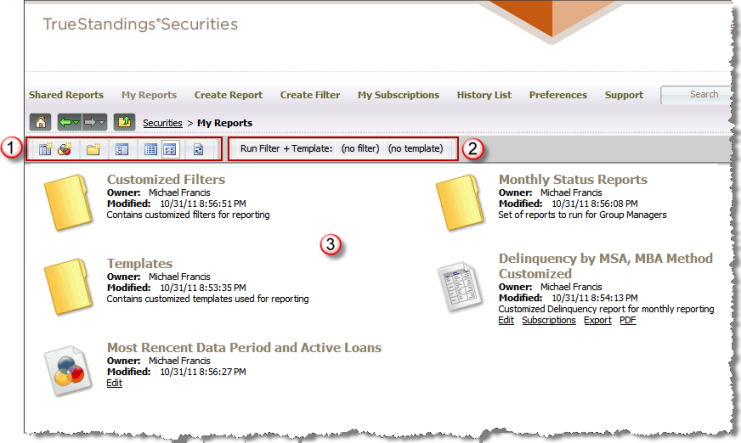
My Reports provides access to the reports, filters and
templates saved with your user account. This page includes a set
of options  to create a report
  , filter
  or subfolder
 . These initial options also
allow you to enable the tree view
. These initial options also
allow you to enable the tree view  , toggle
the page between icon view
, toggle
the page between icon view  and list view
 , and refresh the view of
the page
, and refresh the view of
the page  . If enabled, there
is an option that allows you to combine a standalone filter and template
to run an ad hoc report
. If enabled, there
is an option that allows you to combine a standalone filter and template
to run an ad hoc report  .
.
The remaining elements on this page  represent the custom reports, filters and templates that you have created
and saved under your user account. When you save a report object to My
Reports, you may choose to create a sub-folder to better organize your
personal objects. Objects saved to My Reports are only available to your
user account; if you wish to share with your user workgroup, you must
save these objects to the company shared folder in Shared Reports.
represent the custom reports, filters and templates that you have created
and saved under your user account. When you save a report object to My
Reports, you may choose to create a sub-folder to better organize your
personal objects. Objects saved to My Reports are only available to your
user account; if you wish to share with your user workgroup, you must
save these objects to the company shared folder in Shared Reports.
Note: The screen shot below
is shown in icon view and includes at least one type of report object
(i.e., folder, report, filter, template, custom group, prompt and document).
When you view the My Reports page for your user account, the objects presented
will be those you have previously saved.